Sunday, January 26, 2014

iPad Integration That Works!


Back in November my class received 10 iPads from our technology department and we were told to "have fun". Our district has gone 1:1 in the secondary schools, but we are only one of two elementary classrooms that recieved iPads. Of course I was thrilled, but then I realized that I would need to spend some time thinking about how to successfully integrate them in to our daily routine and find apps that would fit our curriculum. 

We spent the first few weeks exploring the camera apps, creating blog posts on Kidblog, and using Tellagami. But I knew that I wanted them to be part of our Daily 5 and math rotations, so I spent some time talking to other teachers to learn how they are using iPads and finding the best apps to use. 

For our Daily 5 rounds, I found apps for Word Work, Work on Writing, and Read to Self. I set up folders on each iPad so when the students are doing a rotation, they know which folder to open. 


The folders help keep the apps organized. When they have free time they know they can also use the "games" folder, but that one is off limits during our rotations.

To manage all of the apps and 10 iPads, I am using a MacBook Air with the Apple Configurator app. This allows me to search apps at the iTunes Store and then load them to the ipads all at once, using what I call "mission control", a charging device where all of the iPads can be plugged in and managed at one time.


When new apps are added, I simply slide them into the folders. There is a way to set one iPad the way you want it and then duplicate it on the rest, but I have not ventured that far yet.


Our folders and apps

Reading

Generally, the students use "real" books for Read to Self and Read to Someone, but I have created this folder to give them some variety.
 National Geographic books are great for Read to Self. I have also added the Augmented Reality App 
IMAG-N-O-TRON (.99 - not free) 
that goes with the book "The Fantastic Flying Books of Morris Lessmore"


Word Work

There are lots of great apps for spelling, phonics, and grammar. Elephant Feed and Octopus Feed are 4 player games that focus on homophones and synonyms. Spell Sam Spell is also very popular.

Work on Writing

Students use a variety of methods for writing including journaling, the writing process, and blogging. These apps are great for impromptu writing.
Students use Kidblog on our desktops and the iPads. Write About This is a fantastic app that gives a picture and a prompt. Students write and record their voice. It works well for a 15-20 minute rotation. I use the FREE version.


Math

We do one math center per day - 4 days a week for about 20-30 minutes.


We just finished a unit on geometry. There are some fun tangram apps and a geoboard apps. We also used the PBS CyberChase Shape Quest augmented reality app using the printed game board. Math Vs. Zombies and Monster Numbers are also great for fact fluency. 

Create

One of my goals with iPads is for the the students to create content for their digital portfolios. I am still working on the work flow, but there are some really good apps where the students can create and share their learning. Each student has a Kidblog for their content. 
Examples can be found HERE. 

There are many content creation apps that are kid friendly. Generally, when they create something, we save it to the camera roll and then upload it to their blog (with my help). 30 Hands, Educreations, Show Me, Tellagami, Sock Puppets, and Haiku Deck allow students to add photos, videos, text, and voice. 

Games and Hour of Code

These apps are used for free time. We do hour of code in our computer lab as a whole group, but I added the apps for the students who really enjoy it. Mr Crab and Egg Race are the most popular games.  


I have only asked to purchase one app - IMAG-N-0-TRON because you have to buy one license per ipad. So the entire purchase was $10.00. There are some apps, such as Write About This,  that would be nice to have the full version of, but for now the free version works fine.

Rules and Safety

I spend a lot of time reviewing the apps with my kids and showing them how they work. Many of the free apps come with the option to make in-app purchases. They are restricted from doing this, but clicking on the links takes them away from the app. They are learning where to find the little "x" that closes the advertisement. 

Also, the headphones can be an issue. We keep them wrapped up in a tub by the iPads. If they are using an app that has sound, they can use the headphones. Of course, the cords get tangled and sometimes the kids have trouble getting the jack securely in the iPad. We have a few "experts" in the classroom who are really helpful when tech issues arise. 

Hygiene

We keep a bottle of hand gel by the iPads to use before picking one up. Every few days, I wipe the screens down with a very soft, damp cloth. Using cleaners is not recommended on the screens or screen protectors. 


What am I doing?

So now that I have my kids fully engaged, you are probably wondering what I am doing. Having the iPads has created some additional work for me, but using them as part of our Daily 5 and math centers has really freed me up so I can meet REGULARLY with my students! The iPads are not a replacement for good teaching - they are a supplement.

Having Fun and showing our learning

The instructions were to have fun, but more importantly my students are learning how to use the ipad as a learning tool for creating and communicating. It's not a replacement for a book or something to keep them busy. It's a powerful device that turns my classroom into a 21st century learning environment!


I Hope This Helps

There are many, many resources out there for iPads in the classroom which I found very helpful. But, to make them work in my classroom took time and and consideration. What works for me, may not work for you, but I hope I have at least given you some ideas on how to successfully manage and integrate your iPads in the classroom.


Bouncy Bands Review


A few years ago I did a post called "Busy Feet" about active students and a device that my vice-principal came up with to keep the feet busy and the brain attentive.  While this device was helpful, it was noisy and it didn't keep the student engaged for very long. 

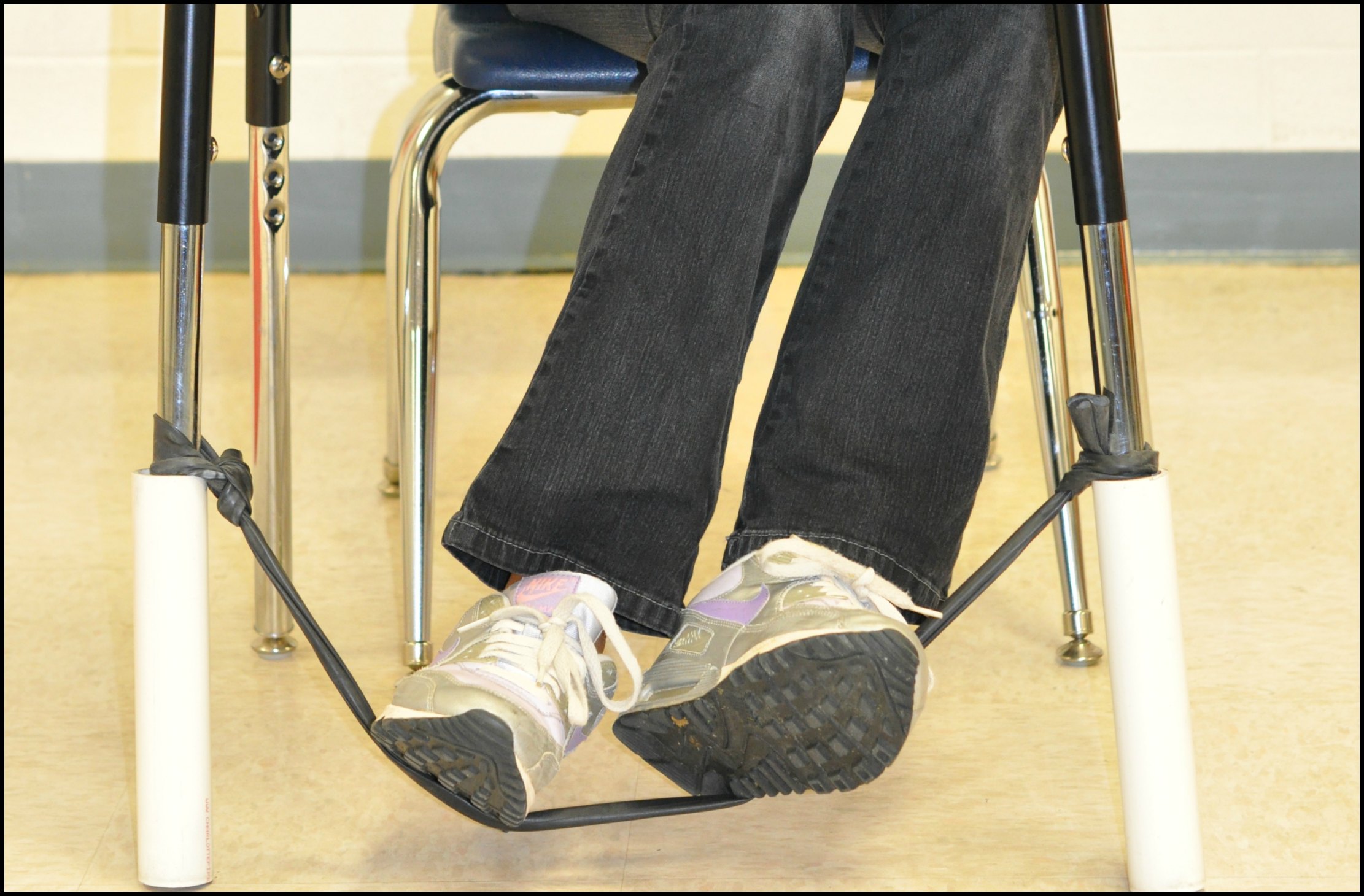
Last summer I was contacted by Scott Ertl at Bouncy Bands about reviewing his product.  It's different from the "busy feet" device because it allows the student to not only bounce their feet, but they can also push and pull the stretchy band. The resistance allows for the student to really work their legs and feet and control the energy. 

The original Bouncy Band
I have been using the first set since the beginning of the year. It's made with pvc pipe and the inner tube of a bike tire. The tube is tied tightly to the chair legs and the pvc pipe prevents the tube from slipping. After two days, my active student had loosened the knots and they had to be retied. I pulled them really tight and haven't had a problem since.


New and improved version:
Scott also sent me the new and improved version of Bouncy Bands which uses a heavy rubber rope that has loops on both ends to prevent coming untied. I am very pleased with the results of this product!

The loops on the rubber rope just slide right on the desk legs. If it's too long, just tie a knot in the rope to tighten it up! 

Great for test day!
An elementary principal has ordered Bouncy Bands for all of her 3rd-5th grade students to help them stay focused and attentive during testing! It started with one class where every student had a set, but they were so popular the principal decided to try them for everybody!

FAQ's

Are Bouncy Bands only for students with ADHD?

No. While students with ADHD are extremely appreciative of being able 
to move without getting in trouble, many other students who are not 
diagnosed with ADHD benefit tremendously from Bouncy Bands as well. 
Others who enjoy Bouncy Bands include students with:
  • Test anxiety
  • Learning disabilities
  • Social anxiety
  • Asperger's Syndrome 
  • A need for movement instead of staying sedentary for hours
  • Kinesthetic learning as a primary learning style

For more information please visit BouncyBands.com

Sunday, December 8, 2013

Frugal Teacher Picks for The Edublog Awards 2013


In addition to The Frugal Teacher, I also have a class blog: Mrs. Morgan's Superstars. I actually spend more time on our class blog during the school year because I like to share what our class is doing and it is a "hub" for my students and their parents. They can access many sites and other information both at school and at home.  I use Edublogs as the platform for this blog. Edublogs uses a Wordpress format and it is designed specifically for teachers. 
Every year, Edublogs presents awards to educators and students in many different categories.  The purpose of the Edublog awards is to promote and demonstrate the educational values of social media.  In addition, the award process gives us the opportunity to find new educator resources that we may not have otherwise found. 

Mrs. Morgan's Superstars has been nominated for an Edublog Award! We were nominated for The Best Class Blog by Nancy Jo Lambert, a librarian in Frisco, TX. I feel very honored to be nominated by one of fellow educators.  
To vote for our class blog, please go HERE.

I would also like to recommend some other nominations. I have been very involved with The Global Classroom Project for over 3 years and several of our members and affiliates have been nominated for awards in other categories. I also have an amazing PLN on Twitter and have included some of them as well. It is very hard to choose just one per category, so I have included two or three along with links to their sites.In most cases, I have had personal contact with all of these nominees. My opinion is based on my knowledge of their work and contribution to education. Please take time to visit the sites so that your decision is based on your own evaluation, not mine. 

Best Class Blog (besides mine :-) - Vote HERE
Mrs. Yollis' Classroom Blog
A Room With a View 
Best Group Blog - Vote HERE

Best Library/Librarian Blog - Vote HERE
Ruth Borchardt Elementary Library
Curtis Elementary Library 

Best Teacher Blog - Vote HERE
MattBGomez
Krissy Venosdale - Venspired 

Best Individual Tweeter - Vote HERE
@techninjatodd - Todd Nesloney
@rafranzdavis - Rafranz Davis
@donalynnbooks - Donalynn Miller

Best Twitter Hashtag - Vote HERE
#globalclassroom
#comments4kids

Best Podcasts or Google Hangouts - Vote HERE
Techlandia
Two Guys and Some iPads
TeacherCast

Best Educational Wiki - Vote HERE
The Global Classroom Project
Save Our Rhinos!
Genius Hour

Best Open PD / Webinar/ Unconference - Vote HERE

Global Education Conference
Classroom Live 2.0

Best Educational Use of Social Network - Vote HERE
Hello Little World Skypers

Lifetime Achievement - Vote HERE
Anne Mirtschin @murcha
Peggy George @pgeorge
THANKS!

Monday, November 4, 2013

Connect2Texas - A Great Resource!


For the past two weeks we have had a Texas Critters Discovery Trunk in our room that was sent to us from The Texas Wildlife Association. The trunk contained pelts and skulls of a white tailed deer and a raccoon, skulls and feet of a red-tailed hawk and a wild turkey, books, rubbing plates, and a newsletter for each student. We had a lot of fun exploring the trunk and learning about native animals of Texas.


skulls and feet

bird calls and replicas of an Armadillo and Texas Horned Toad


The students had fun with the rubbing plates and used the books in the trunk to identify the animals by their footprints.


I found out about the trunk through Connect2Texas - a great resource for educators:

Connect2Texas is a network of Texas-based educational content providers including museums, cultural, historical, and scientific organizations, and authors.  These providers utilize interactive videoconferencing to connect to schools and deliver live educational programs and professional development to school children and educators around Texas and across the country.  Bring the scientists, experts, and authors directly to your students without leaving the classroom! connect2texas.net

The Texas Wildlife Association is just one of the many program providers. We did a live video-conference with them and learned about nocturnal animals. We also participated in "So You Think You Saw What Happened" by The Amon Carter Museum. The Perot Museum visited our school and did a live presentation called "Fire and Ice". 

Originally, I contacted the Perot Museum about doing a video-conference presentation, but then I learned about their scholarship program and was able to bring them to our school for a reduced cost. Other Connect2Texas providers that have scholarships available to pay for distance learning programs include The Amon Carter Museum, Texas Cowgirl Museum, and the Fort Worth Zoo

Some of the programs have fees, but there are many that are free. The discovery trunk was provided at no charge. 

Many schools in Texas cannot afford to send students on fieldtrips. Connect2Texas provides a wide variety of programs that meet state standards (TEKS) and can help you bring the world to your students!


Photo credit: Miller


Sunday, November 3, 2013

Our Global Classroom Projects

Since the beginning of school, my classroom has been busy with many global projects.  We started off September with International Peace Day and Dot Day.  In October, Siyanda the Traveling Rhino arrived along with Charlotte, a flat friend from Australia.  These projects have kept us busy, but it's a good busy. We are learning about the world around us, different cultures, and empathy. 

The Traveling Rhino Project 
Karen Stadler @ICT_Integrator

This Global Classroom Project was created by Karen Stadler in S. Africa after she visited Kruger National Park July 2012. Poachers are killing rhinos in large numbers for their horns and Karen wanted to bring awareness to the situation. She sent 5 Rhinos around the world and the project caught on. At this point, there is no end in sight for this project. 

This map shows a different color for each rhino and where they have been so far.
Educators are keen to participate because they see the value in the project:
  • To educate the children of South Africa and the rest of the world about these beautiful creatures.

  • To raise awareness among the children of the world as to the plight of these gentle giants. To unite the voices of the children of the world in asking the powers that be i.e. governments, organisations, institutions etc. to take IMMEDIATE action.

  • To try to make a difference in our world and in the future existence of the rhinos, for the future of our children

  • To promote and nurture empathy.


Flat Friends and Mascot Exchange 
Julie Simmons @BJacketsFan

I received an email from Jane Sloan at Roseville College Junior School in Australia asking if we would host a flat friend. I have never participated in this type of project so I agreed.  Charlotte arrived with her friend Koala and a book all about Australia and her school. My students loved learning about Australia and comparing our two schools. Charlotte accompanied us on a field trip to a local theater and inspired us to create a book all about Texas for her class.   

The value of this project includes:

  • To share information about one’s own community and culture with students from other cultures and communities

  • To learn about places around the world by monitoring the adventures of flat friends’ visits to participating classrooms.

  • To develop an understanding of maps and to identify other places on a map


Mystery Location / Mystery Skype
A collaborative effort by HLW Skypers

This project can be something you do weekly throughout the year. It is a great way to meet and connect with new classrooms. So far, my students have participated in 6 mystery skype sessions.  It takes a while to teach them the map and communication skills needed to be successful for this activity, but it is fun and engaging. The Global Classroom Project currently has almost 200 classes on their list that you can connect with! 

The value of this project includes:
  • Students will use map skills to find the location of the mystery classroom

  • Students will use communication and critical thinking skills to ask questions to help them find the mystery location.

  • Classes communicate with other classrooms via Skype or Google+ Hangouts.

  • Students will learn to respect and appreciate the cultures and customs of others.

  • Students will be able to see the differences and similarities between themselves and others around the world.


Currently the Global Classroom Project is hosting 17 projects. These projects were created by educators for educators who understand that 21st century learning means connecting and learning with classrooms around the world. 

Please join Michael Graffin for our official launch at the Global Education Conference. During his online presentations, you will have the opportunity to meet the project creators and participants and learn about each project. He will be doing two presentations to accomodate time zones:


#1 - Global Education Conference (Nov 22 at 11:00GMT - Time converter)

6AM New York, 11AM London, 7PM Shanghai)


#2 - Saturday Nov 23 (20:00GMT, 3PM New York, sunday Nov 24 - 7AM Sydney, 9AM Auckland) (Time Converter)


Wednesday, October 23, 2013

Texas Science-Force and Motion


We just finished up a great unit on force and motion! I have done the spin, roll, and slide activities for the past few years, but this year I added a few more resources. 

In the science lab I set up 5 stations:

1. Spin: Students use Doodle Top Markers to spin and track the path of the spinning motion. I just use one large piece of butcher paper so that the spinners are free to roam as far and wide as they want.

2. Roll: Students roll marbles dipped in tempera paint on paper. They are given one marble at a time, one color at a time. When the marble gets dry, we switch to a new marble in a different color. I usually use 3. It works well using lids from copy paper boxes and 12 x 18 manilla paper. Be sure and have them put their name on their paper first. Students notice that it takes more force to move the marble when it rolls on to thicker parts of the paint. 

3. Slide: Students slide chalk on its side across colored construction paper to create a design. We also discuss the friction caused by the chalk and the paper. 

4. Ramps: Students use different sizes of card board, blocks, and tissue boxes to set up ramps. Then, they use objects like toy cars, wooden blocks, pencils, markers, rulers, and balls to explore speed, friction, and gravity.  I clipped felt on to one piece of cardboard and some silky fabric to another so the students could experiment with friction. 

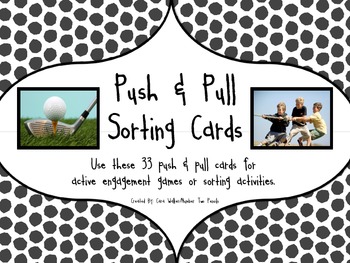
5. Push/Pull Sorting Activity: This challenging partner activity generated discussion and critical thinking. Students sorted pictures in to push and pull categories. Some were tricky. A few pairs decided to make a third category that included both push and pull. I found this FREE activity from Number Two Pencils on Teachers Pay Teachers. 


Spin, Roll, Slide flip book: This handy FREE download from In That Room on Teachers Pay Teachers made it easy for my students to complete their performance indicator. They folded, cut, wrote and drew descriptions of each motion on the inside flap.  

Additional Resources:  I signed up for the 60 day trial of Discovery Education Science Techbook and was delighted to find videos and interactive activities to supplement this unit. They have a Texas version that is in alignment with the Texas Essential Knowledge and Skills (TEKS) and the lessons are set up in the 5E format with easy to follow links. Some of the activities are also great for interactive white boards. We will use some of the resources from the Techbook for our next unit on magnetism.


Check out our learning!


Sunday, October 13, 2013

My 2nd Edcamp

Our official #edcampdallas photo


Yesterday I attended #edcampdallas with some of my favorite educators: @gpmorgan3 @janhodge2006 @margielsimpson and Karen McKenzie. We attended #edcampfwtx back in July so we knew what to expect this time.  We started by putting sticky notes all over a table with the topics we wanted learn about. Next, the sticky notes were storted (affinity map style) and then the sessions were created!

Session choices ranged from Skype, Augmented Reality, Genius Hour, PBL, iPad integration and more!  One of my favorite session was led by Jon Samuelson @ipadsammy: "Things that Rock and Things that Suck". Jon called out different topics and the participants went to one side of the room if they think it rocks or the went to the other side if they think it sucks. Neutral territory was in the middle. Topics included: flipped classroom, genius hour, digital textbooks, and a few others. Each time we moved to a new position we had an open discussion - which I really enjoyed. I think this would be a great learning model for my own classroom that would help get kids thinking and talking - I would probably change the name though :-)

I also enjoyed learning about digital storytelling apps for iPad led by Heather Russell @getheather. I don't have iPads in my classroom, but someday I hope to have a few. Tellagami was my favorite. It is easy to use and students could get very creative with it. Toontastic also provides a lot of options and opportunities for students to create and for teachers to assess their understanding.


In addition to all of the great sessions it was great meeting some of my Twitter friends. #2ndchatter @AllisonHoganESD and I met and it was also nice to see some friends and presenters from #ISTE13 and edcampfwtx: @Kenya75 @akbusybee @techninjatodd @lackeymartha @RafranzDavis and more!

#2ndchat peep Allison Hogan
Jan is proud of her new edcamp t-shirt!

Edcamp Swag

I won and "Ish" T-shirt!
A big THANK YOU is also in order for @Mattbgomez @8amber8 @kenya75 @akbusybee and the rest of the #edcampdallas team. It was an awesome day of learning and connecting!