Showing posts with label classroom management. Show all posts
Saturday, June 14, 2014
TCEA Tots and Tech 2014 Presentations
I am very excited about attending TCEA Tots and Technology Conference in Galveston, TX. It will be two days of learning from the very best educators! I love this conference and am looking forward to presentations and hands-on learning that I can use in my 2nd grade classroom. Check out the complete schedule!
My Presentations
Tuesday June 17th at 8:00 am
You CAN do it ALL! Transform your classroom into a 21st Century Learning Environment
Tuesday June 17th at 2:00 pm
Reduce the Paper! Student-Created Digital Portfolios with iPads
Click HERE for link to Google Presentation
See you there!
Sunday, January 26, 2014
iPad Integration That Works!
Back in November my class received 10 iPads from our technology department and we were told to "have fun". Our district has gone 1:1 in the secondary schools, but we are only one of two elementary classrooms that recieved iPads. Of course I was thrilled, but then I realized that I would need to spend some time thinking about how to successfully integrate them in to our daily routine and find apps that would fit our curriculum.
We spent the first few weeks exploring the camera apps, creating blog posts on Kidblog, and using Tellagami. But I knew that I wanted them to be part of our Daily 5 and math rotations, so I spent some time talking to other teachers to learn how they are using iPads and finding the best apps to use.
For our Daily 5 rounds, I found apps for Word Work, Work on Writing, and Read to Self. I set up folders on each iPad so when the students are doing a rotation, they know which folder to open.
The folders help keep the apps organized. When they have free time they know they can also use the "games" folder, but that one is off limits during our rotations.
To manage all of the apps and 10 iPads, I am using a MacBook Air with the Apple Configurator app. This allows me to search apps at the iTunes Store and then load them to the ipads all at once, using what I call "mission control", a charging device where all of the iPads can be plugged in and managed at one time.
Our folders and apps
Reading
Generally, the students use "real" books for Read to Self and Read to Someone, but I have created this folder to give them some variety.
![]() |
National Geographic books are great for Read to Self. I have also added the Augmented Reality App
IMAG-N-O-TRON (.99 - not free)
that goes with the book "The Fantastic Flying Books of Morris Lessmore"
|
Word Work![]() |
There are lots of great apps for spelling, phonics, and grammar. Elephant Feed and Octopus Feed are 4 player games that focus on homophones and synonyms. Spell Sam Spell is also very popular.Work on WritingStudents use a variety of methods for writing including journaling, the writing process, and blogging. These apps are great for impromptu writing. |
![]() |
Students use Kidblog on our desktops and the iPads. Write About This is a fantastic app that gives a picture and a prompt. Students write and record their voice. It works well for a 15-20 minute rotation. I use the FREE version.MathWe do one math center per day - 4 days a week for about 20-30 minutes.![]()
We just finished a unit on geometry. There are some fun tangram apps and a geoboard apps. We also used the PBS CyberChase Shape Quest augmented reality app using the printed game board. Math Vs. Zombies and Monster Numbers are also great for fact fluency.
Create
One of my goals with iPads is for the the students to create content for their digital portfolios. I am still working on the work flow, but there are some really good apps where the students can create and share their learning. Each student has a Kidblog for their content.
Examples can be found HERE.
There are many content creation apps that are kid friendly. Generally, when they create something, we save it to the camera roll and then upload it to their blog (with my help). 30 Hands, Educreations, Show Me, Tellagami, Sock Puppets, and Haiku Deck allow students to add photos, videos, text, and voice.
Games and Hour of Code
These apps are used for free time. We do hour of code in our computer lab as a whole group, but I added the apps for the students who really enjoy it. Mr Crab and Egg Race are the most popular games.
I have only asked to purchase one app - IMAG-N-0-TRON because you have to buy one license per ipad. So the entire purchase was $10.00. There are some apps, such as Write About This, that would be nice to have the full version of, but for now the free version works fine.
Rules and Safety
I spend a lot of time reviewing the apps with my kids and showing them how they work. Many of the free apps come with the option to make in-app purchases. They are restricted from doing this, but clicking on the links takes them away from the app. They are learning where to find the little "x" that closes the advertisement.
Also, the headphones can be an issue. We keep them wrapped up in a tub by the iPads. If they are using an app that has sound, they can use the headphones. Of course, the cords get tangled and sometimes the kids have trouble getting the jack securely in the iPad. We have a few "experts" in the classroom who are really helpful when tech issues arise. Hygiene
We keep a bottle of hand gel by the iPads to use before picking one up. Every few days, I wipe the screens down with a very soft, damp cloth. Using cleaners is not recommended on the screens or screen protectors.
What am I doing?
So now that I have my kids fully engaged, you are probably wondering what I am doing. Having the iPads has created some additional work for me, but using them as part of our Daily 5 and math centers has really freed me up so I can meet REGULARLY with my students! The iPads are not a replacement for good teaching - they are a supplement.
Having Fun and showing our learning
The instructions were to have fun, but more importantly my students are learning how to use the ipad as a learning tool for creating and communicating. It's not a replacement for a book or something to keep them busy. It's a powerful device that turns my classroom into a 21st century learning environment!
I Hope This Helps
There are many, many resources out there for iPads in the classroom which I found very helpful. But, to make them work in my classroom took time and and consideration. What works for me, may not work for you, but I hope I have at least given you some ideas on how to successfully manage and integrate your iPads in the classroom.
|
Wednesday, July 3, 2013
#ISTE13 Reflection and a New Goal
![]() |
| Learning from and collaborating with like-minded educators: Karen Lirenman, Melvina Kurashige, and Paula Naugle |
The overriding theme that I kept encountering was, while all of the technology and tools are important, the relationships we have with our students and finding ways to inspire and engage them are far more important than the technology itself. Many of us are in school districts with limited resources or where we are the "lone wolf'" on campus, but we are still able to connect globally and engage our students in new and innovative ways. Our hope is that our actions will inspire our colleagues to get on board.
For the past two years I have called my classroom a "global classroom" because of the connections we have made through blogging, Edmodo, Skype, and Twitter. My students have global awareness because they have communicated with students around the world.
My goal for this next year is to not only make connections, but to take it to the next level by teaching my students how collaborate and create with other students. I want them to be able to create, solve problems, innovate, and find their passion!
How will I do this? I am comfortable with the tools, now I have to change with way I teach by giving up some control and allowing for some messiness. My students will take the lead and I will challenge them find their passion.
It won't be easy...I like structure. I like calm and quiet. But I also like creativity and that can't always happen in a calm and structured environment. I will have to find time each week for this to happen.
There! I've put it in writing. Now I can't turn back! In order to meet this goal, I will be actively learning from other educators this summer by staying connected through Twitter and other online professional communities.
What goals have set for the summer and upcoming school year?
Saturday, September 29, 2012
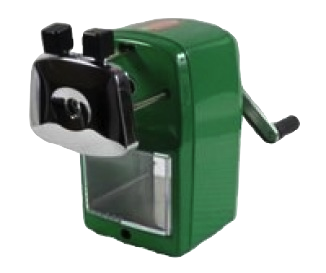
Pencil Sharpener Giveaway from Classroom Friendly Supplies
Win a Classroom Friendly Supplies Pencil Sharpener!
* Giveaway has ended. Congratulations Kelby Black!
It's really easy to use too. Here is a how-to video:
To win your very own sharpener, just fill out out the easy entry Rafflecopter form below. The giveaway starts Sunday September 30th and ends Sunday October 7th at midnight. One winner will be chosen based on the most points and random number selection.
Sunday, September 2, 2012
Stealing Minutes
For the first time in 3 years, our 2nd grade schedule has changed - which leaves us with a 20 minute block between lunch and PE. I usually do a restroom break after lunch, but that takes at least 10 minutes. That leaves another 5-7 minutes of dead time before we go to PE. So, I decided that we would "steal" some reading minutes during our restroom break and just stay in the hall until it is time to line up for PE! We also have 15 minutes of hall time in the morning before school starts. I just put a basket by our door with a variety of books and some math flashcards. No more "dead" time!
Thursday, July 26, 2012
Books for the First Weeks of School
As the new school year approaches, I am reviewing my plans from previous years and working on ways to improve my lessons. The Daily 5 has completely changed the way I teach and has allowed me more time to read to my students and teach through mini lessons. Mini lessons are short periods of time where you focus on reading or writing skills and strategies. Mini lessons at the beginning of the year can also cover classroom procedures, rules, and behavior. Here are a few of my favorites for the first few weeks of school:
First Day Jitters
This is a good book to help break the ice and let the students know that they are not the only ones who get nervous on the first day of school.
Chrysanthemum
I usually read this on the second day and do activities using the students' names.
What if Everybody Did That?
I already used this question a lot in my classroom and was thrilled to see that there was a book with the same title! I like this book because it shows the action and the consequence. It covers some good areas for discussion such as yelling out in class and littering.
No David!
Another book that shows the action and the consequence. My students and I make anchor charts with the classroom rules. These books helps generate ideas for setting our classroom guidelines.
My Mouth is a Volcano
Another good one to help generate discussion about waiting your turn to speak and being a good listener.
The Recess Queen
A fun book with lots of rhyming and a good message about playground behavior and bullying.
A Bad Case of the Stripes
A great book for getting the students to understand that it is o.k. to be different.
The Brand New Kid
A nice story about a new kid who looks and sounds different from the other students.
Whoever You Are
I use this book to help introduce our involvement in The Global Classroom Project. Students see that there are kids all over the world just like them!
I hope this gives you some good ideas for the the start of school. What books do you read to your students during the first weeks?
Subscribe to:
Posts (Atom)


.png)